Contents
- 1 1. Cheap or shared hosting
- 2 2. Unoptimized images
- 3 3. No caching plugin
- 4 4. Too many plugins
- 5 5. Bloated or poorly coded theme
- 6 6. Outdated PHP version
- 7 7. No CDN (Content Delivery Network)
- 8 Quick reference: all 7 issues and fixes
- 9 When to just get it done professionally
- 10 Frequently asked questions
- 10.1 How do I know if my WordPress site is slow?
- 10.2 What is a good page load time for a WordPress website?
- 10.3 Can I speed up my WordPress site without a developer?
- 10.4 Will speeding up my site help my Google rankings?
- 10.5 How much does it cost to fix a slow WordPress site?
- 10.6 Which WordPress caching plugin is best in 2026?
- 10.7 Does a slow website affect WhatsApp and phone inquiries too?
- 10.8 I am based in Pakistan. Does hosting location matter for my speed?
You built your WordPress website, it looks great, but when you open it on your phone, it takes forever to load. Sound familiar?
A slow website is not just annoying. It is costing you real money. Studies show that more than half of mobile users will abandon a website that takes longer than three seconds to load. And Google uses page speed as a direct ranking signal — meaning a slow site ranks lower in search results, which means fewer visitors, fewer inquiries, and fewer sales.
The good news? Most WordPress speed problems come from a handful of common mistakes — and every single one of them is fixable.
In this guide, we will walk you through the seven most common reasons your WordPress site is slow, and exactly what you can do to fix each one.
This is the number one cause of slow WordPress sites, and the one most people overlook.
When you sign up for cheap shared hosting (think low-cost local providers or globally known budget hosts), your website shares server resources with hundreds — sometimes thousands — of other websites. When those sites get traffic, your site slows down. Your Time to First Byte (TTFB) — the time before your page even starts loading — can easily go above one second just because of bad hosting.
How to fix it:
- Upgrade to a managed WordPress host or a VPS (Virtual Private Server).
- Cloudways is one of the most cost-effective options starting around $10/month, with servers you can locate close to your audience in Pakistan, Saudi Arabia, or Qatar.
- If budget is tight, SiteGround is a reliable entry point that performs much better than basic shared hosts.
| ✓ Quick test Run your site through GTmetrix (gtmetrix.com). If your TTFB is above 600ms, hosting is almost certainly part of your problem. |
| Is your website on bad hosting? When rebuilding a WordPress site from scratch, we choose the right hosting, configure the server, and make sure your site loads fast — right from day one. Talk to Umar about your WordPress project → |
2. Unoptimized images
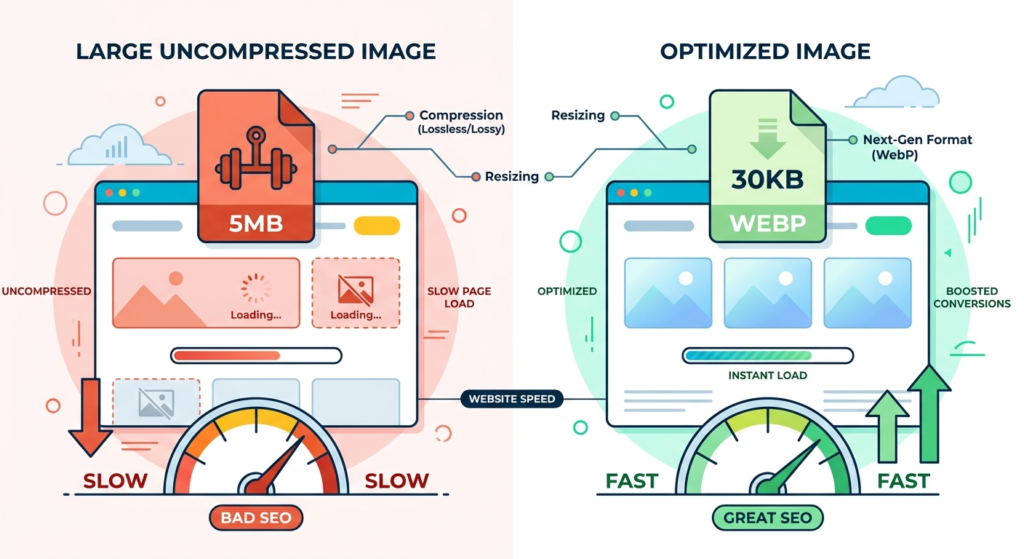
Unoptimized images are the fastest win you can get when fixing a slow WordPress site. This is also the most common mistake.
When you upload a photo directly from your phone or camera, it can be anywhere from 2MB to 8MB in size. WordPress displays it at a much smaller size on the page — but it is still loading the full original file. That one image can be bigger than your entire page should be.
How to fix it:
- Install ShortPixel or Smush — both compress images automatically when you upload them.
- Convert images to WebP format. WebP files are typically 30% smaller than JPEG at the same visual quality.
- Enable lazy loading — images below the visible screen area load only when the user scrolls down to them.
- For existing images already on your site, use a bulk compression tool to fix them all at once.
| ✓ Target to aim for Your total page size should be under 1.5MB. Use GTmetrix’s ‘Page Details’ tab to see exactly how much your images are contributing. |
3. No caching plugin
WordPress is a dynamic platform. Every time someone visits your site, WordPress talks to the database, pulls your content, builds the page, and sends it to the visitor. This process repeats for every single visitor, every single time.
Caching solves this by saving a static version of your pages. The next visitor gets the saved version instantly, without WordPress doing all that work again.
How to fix it:
- Install WP Rocket (paid, the gold standard) or LiteSpeed Cache (free and excellent if your host supports it).
- Enable page caching, browser caching, and GZIP compression in the plugin settings.
- If you use Cloudflare (which you should), enable the APO (Automatic Platform Optimization) feature for WordPress — it is $5/month and makes a dramatic difference.

4. Too many plugins
Plugins are one of WordPress’s biggest strengths — and one of its biggest weaknesses. Every plugin you install adds code that runs on your site. Some plugins load extra scripts and stylesheets on every single page, even pages where they are not being used. Others run constant background processes, query the database inefficiently, or conflict with each other.
Think of it like this: a few items in a backpack are fine, but overpacking slows you down.
How to fix it:
- Go through your plugin list and ask: Is this plugin still needed? Is there a lighter alternative?
- Use Query Monitor (free) to identify which plugins are consuming the most resources.
- Remove any plugin you have not actively used in the last three months.
- Deactivate plugins one by one and run a speed test after each to find the worst offender.
5. Bloated or poorly coded theme
Many popular WordPress themes — especially multipurpose themes from marketplaces — are packed with features, page builders, sliders, font libraries, and design options that you will never use. All of that code loads on every page, adding weight your site does not need.
A theme designed to do everything often does nothing fast.
How to fix it:
- Switch to a lightweight theme. GeneratePress and Astra are both excellent choices — they load in under 50KB by default.
- Avoid page builders with heavy overhead like older versions of Divi or WPBakery when performance is a priority.
- If you are attached to your current design, a developer can strip out unused CSS and JavaScript from your theme to reduce its footprint significantly.
| Thinking about a theme switch or a site rebuild? A professionally built WordPress site uses a clean, lightweight foundation so you never have to fight your own theme for speed. We build WordPress sites the right way — fast by design. Get a free quote for your WordPress project → |
6. Outdated PHP version
PHP is the programming language that runs WordPress. If your hosting is running an old version of PHP, your site is slower than it needs to be — sometimes significantly.
According to Kinsta’s 2026 PHP performance benchmarks, upgrading from PHP 7.4 to PHP 8.3 improves WordPress throughput by around 15–20%. That is a free speed improvement — no design changes, no new plugins.
How to fix it:
- Go to Tools → Site Health in your WordPress dashboard. It will show your current PHP version.
- If you are on PHP 7.x, contact your host and ask them to upgrade to PHP 8.2 or 8.3.
- Most reputable hosts allow you to switch PHP versions from your control panel in minutes.

7. No CDN (Content Delivery Network)
When someone in Lahore visits your website that is hosted on a server in the UK, every image and file has to travel that entire distance. This adds latency — a delay before the content even starts downloading.
A CDN solves this by storing copies of your site’s files on servers around the world. A visitor in Karachi gets files from a nearby server. A visitor in Riyadh gets files from a server in the Middle East. Everyone gets faster load times.
How to fix it:
- Set up Cloudflare (free tier is excellent) as your CDN. It takes around 30 minutes to configure and makes a noticeable difference for international visitors.
- If you already have Cloudflare, enable their APO (Automatic Platform Optimization) for WordPress for an additional boost.
Quick reference: all 7 issues and fixes
| Issue | Difficulty | Quick fix |
| Bad hosting | Hard (requires migration) | Move to Cloudways or SiteGround |
| Unoptimized images | Easy | Install ShortPixel |
| No caching | Easy | Install WP Rocket or LiteSpeed Cache |
| Too many plugins | Medium | Audit and remove unused plugins |
| Bloated theme | Medium | Switch to GeneratePress or Astra |
| Outdated PHP | Easy | Upgrade to PHP 8.3 via host panel |
| No CDN | Easy | Set up Cloudflare free tier |
When to just get it done professionally
Some of these fixes — like switching hosting, rebuilding with a clean theme, or properly configuring a caching plugin — can get complicated fast, especially if you have an existing site with content and active users.
If you have gone through this list and your site is still slow, or if you would rather start fresh with a site that is built fast from day one, that is exactly the kind of work I do.
| Need a fast, clean WordPress site? I build WordPress websites for Pakistani businesses and GCC clients — lightweight, SEO-optimized, and built to load fast on mobile. No bloat, no unnecessary plugins, no heavy themes. Get in touch for a free consultation → |
Frequently asked questions
How do I know if my WordPress site is slow?
Run your URL through GTmetrix or Google PageSpeed Insights (pagespeed.web.dev) — both are free. A good WordPress site should score above 80 on mobile and load in under 3 seconds. If your Largest Contentful Paint (LCP) is above 4 seconds or your total page size is above 3MB, you have a performance problem that needs fixing.
What is a good page load time for a WordPress website?
The industry benchmark is under 2.5 seconds for Largest Contentful Paint (LCP) and under 3 seconds for full page load. For mobile users in Pakistan and the GCC region — where many visitors are on 4G rather than broadband — aim for under 2 seconds. Every second of delay reduces conversions by an estimated 7 percent.
Can I speed up my WordPress site without a developer?
Yes — several fixes on this list are beginner-friendly. Installing a caching plugin, compressing images with ShortPixel, and setting up Cloudflare can all be done without coding knowledge and will make a noticeable difference. However, issues like bad hosting, a bloated theme, or poorly written plugin code usually require a developer to fix properly, especially if you want results without breaking anything.
Will speeding up my site help my Google rankings?
Yes, directly. Google uses Core Web Vitals — which include page speed metrics like LCP and CLS — as a ranking signal for all searches. A faster site also reduces bounce rate (people leaving before the page loads), which is another indirect ranking factor. In competitive markets like Karachi or Al Khobar, even a small speed advantage over competitors can move you up in local search results.
How much does it cost to fix a slow WordPress site?
It depends on the cause. Simple fixes like installing a caching plugin or compressing images cost nothing but your time. Upgrading hosting typically costs between $10 and $30 per month extra. If the problem is a poorly built theme or badly written custom code, a professional rebuild or audit is usually the most cost-effective long-term solution — and ensures the problem does not come back.
Which WordPress caching plugin is best in 2026?
WP Rocket remains the most complete paid option at around $59 per year — it handles page caching, file minification, database cleanup, and lazy loading in one place. For a free option, LiteSpeed Cache is excellent if your host runs LiteSpeed servers (Hostinger and many cPanel hosts do). W3 Total Cache is powerful but complex to configure correctly. If you use Cloudflare, their APO (Automatic Platform Optimization) feature for WordPress is $5 per month and significantly outperforms most plugin-only solutions.
Does a slow website affect WhatsApp and phone inquiries too?
Yes — especially in Pakistan and the GCC where many potential clients first find you on mobile. If your site takes more than three seconds to load, a large percentage of visitors leave before they ever see your phone number, WhatsApp link, or contact form. A fast, mobile-optimized site means more of your paid and organic traffic actually converts into real inquiries.
I am based in Pakistan. Does hosting location matter for my speed?
It does — but less than it used to, thanks to CDNs. If your audience is primarily in Pakistan, a server in Singapore or India will have lower latency than one in Europe or the US. Cloudways lets you choose your server location when signing up. That said, pairing any decent host with Cloudflare’s CDN (free tier) usually makes the raw server location less critical, because most of your static files are served from a location close to your visitor regardless of where your server sits.

Umar Rajput is a Pakistan-based digital marketing specialist with hands-on experience building and ranking websites for international clients. He has worked on SEO strategy and web development for small businesses, ecommerce stores, and service-based companies across multiple industries.